


Z32 300ZX European Market Registry
European-market Z32 300ZXs were built for Europe, Australia and other right- and left-hand-drive export markets, with their own VIN format, model codes and equipment. Look one up to see how it left the factory: build month, paint and trim codes, and what its model code says. Owners add their car through their XenonZcar forum garage and keep its details and photos up to date.
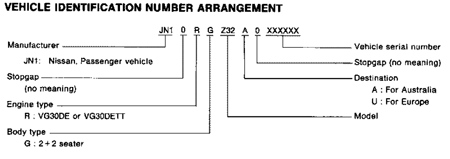
European VINs look like JN10RGZ32U0012345. The VIN (chassis number) is stamped at the back of the engine bay, and the identification plate is on the radiator core support. US-market cars are in the US registry.
- Cars with History Records
- 0
- VINs in Nissan’s catalog
- 5,757

Non-US VIN Number Arrangement
European and other export Z32s use a different VIN layout from US cars, with no check digit. The letter after the zero before the serial number gives the destination: U for Europe, A for Australia.
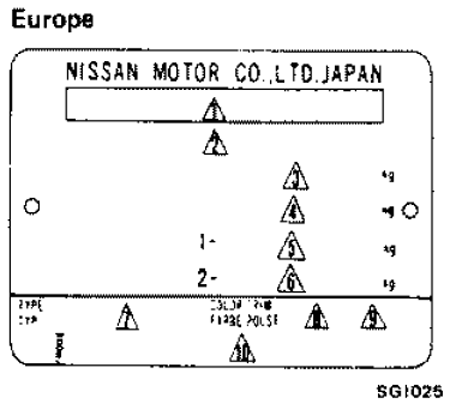
Model Plate Arrangement
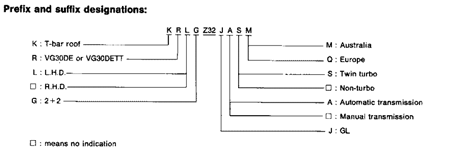
The identification plate shows the model code, paint and trim codes. The model code (for example KRLGZ32JASQ) reads like this:
European Z32 300ZX Registry Search
Search by any mix of VIN (or part of one), model code, build month, paint and trim codes, condition and owner. Factory records come from Nissan’s European parts catalog (FAST), which lists 5,757 of these cars; not every car is listed, so a VIN that isn’t found can still be genuine. Owner names and places match only owners who chose to show them.
European Z32 300ZXs in members’ garages
No member cars yet. Be the first to add yours!
Is one of these cars yours?
Owner details are kept up to date from your XenonZcar forum garage. Log in, claim your car once (only one member can hold each car, so nobody else can change your car’s record), and then you can update the owner name, location, condition, mileage, website link, comments and photos any time. Your name and location show publicly only if you choose; otherwise only XenonZcar admins see them. Your car also shows on your forum profile.
- Log in to the XenonZcar forum (or join; it’s free).
- Open My garage, pick Z32 300ZX European market (1989–1996) under “Which Z?” and enter the 17-character VIN, e.g. JN10RGZ32U0012345.
- If the car is already in the registry and no other member has it, it goes straight into your garage with the details you entered. Otherwise an admin confirms the claim, usually within a day or two. Sold the car? Transfer it to the buyer from your garage and it stays in the car’s history.
All registries
Sources Used
- VINs, build months, paint and trim codes: Nissan’s European parts catalog (FAST)
- Plate and VIN diagrams: Nissan 300ZX factory service manuals (non-US editions)
- Owner details: XenonZcar forum members